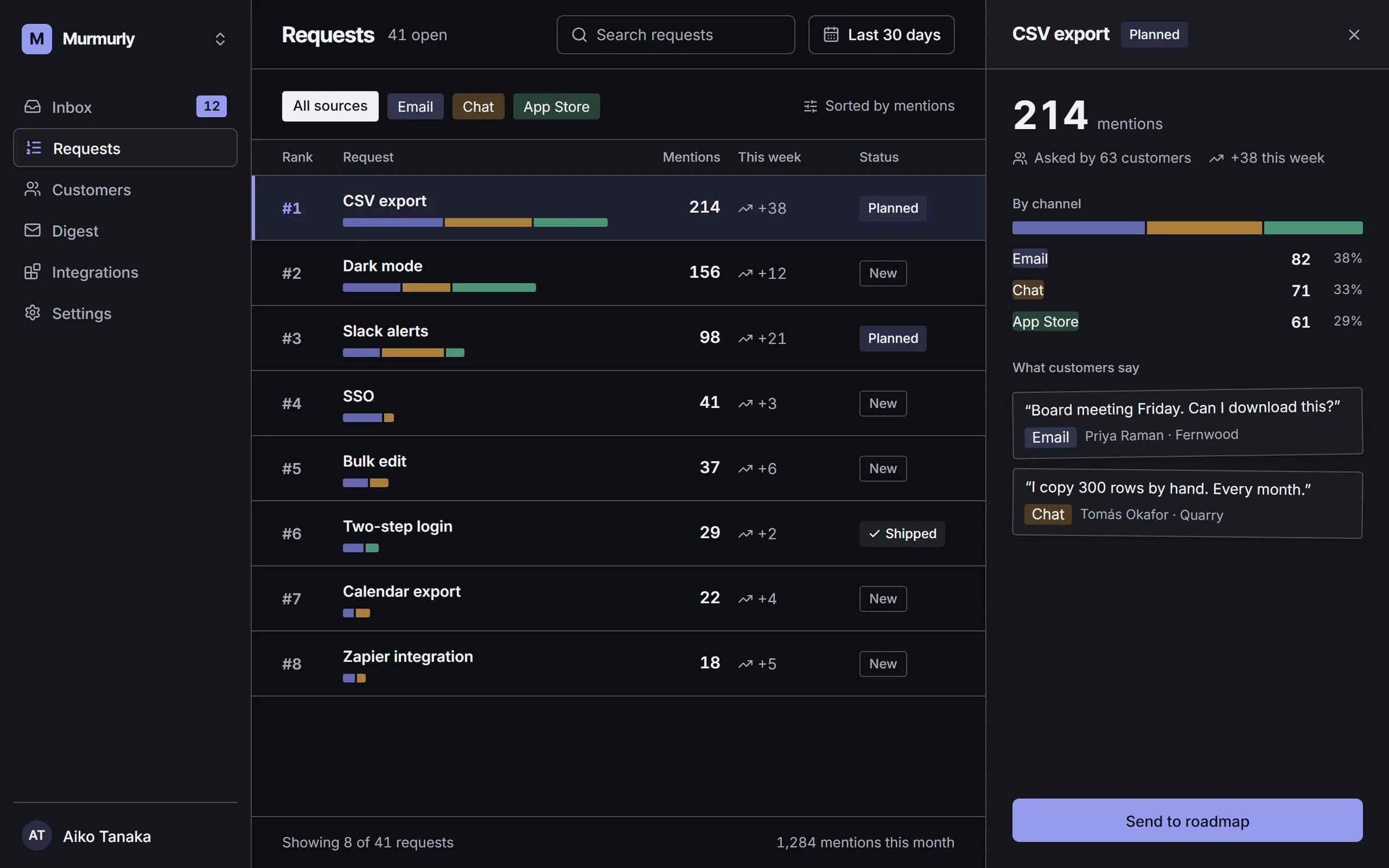
Every channel, one pile
Connect your support inbox, live chat and app store reviews. New feedback flows in on its own, in any language.
- Email, chat, reviews and help desk tickets
- Two years of old messages imported in one go
- Nothing to tag by hand
Murmurly reads every email, chat and review and piles the same request together, so the tallest stack is what to build next.
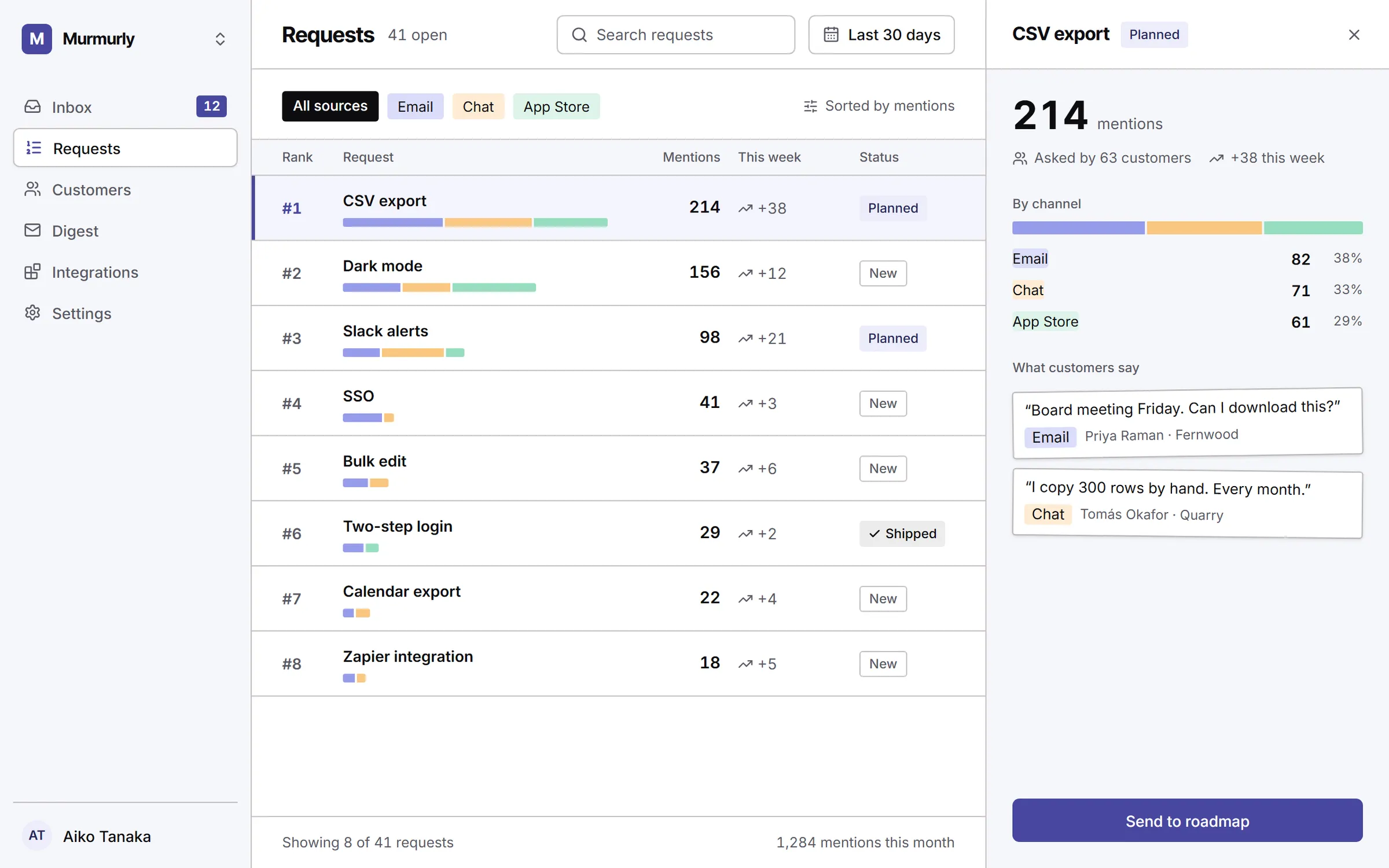
Feedback arrives everywhere at once, and the loudest voice wins.
Requests hide in support tickets, sales calls, app reviews and a chat thread from March.
Nobody knows if “a lot of people” means 4 or 400, so the roadmap follows whoever spoke last.
People ask, wait, and leave. They never learn you shipped the thing they wanted.
Murmurly turns the noise into one ranked list, and tells every customer when their request ships.
Set up in an afternoon. No tagging by hand.
Connect your support inbox, live chat and app store reviews. New feedback flows in on its own, in any language.
Murmurly reads each message and stacks it with the others that ask for the same thing, even when the words are different.
See how often each request comes up, who asked, and how much those customers pay. Pick with numbers, not guesses.
When a request ships, Murmurly writes to every customer who asked for it. They feel heard, and they stay.
Every plan reads every message. A few extras come with Team and Business.
Email, chat, reviews and tickets in one place.
The same request, in any words, lands in one stack.
The tallest stack goes first.
Every count links back to real customers.
Count paying customers louder, if you want to.
BusinessOne Monday email with the requests that grew most.
Team and BusinessKnow when a stack grows; send it to your roadmap in one click.
Team and BusinessTell everyone who asked that it shipped.
Connect a channel in a few clicks. If a tool can forward an email, Murmurly can read it.
What happens when every request gets counted.

“We used to argue about what customers wanted. Now we open Murmurly and look at the tallest stack. Our last three releases came straight from it.”
41%fewer cancellations in six months
Read Fernwood's storySupport, product and engineering, in their own words.
“Clinics used to ask if anyone read their emails. Now they get a note the day their request ships.”
 Maya LindgrenCustomer Success, Fernwood
“Our roadmap meeting went from an hour of opinions to fifteen minutes with a list.”
 Jonah WellerProduct Manager, Pinecast
“We reply to feature requests twice as fast, because the answer is already in the stack.”
 Amara NwosuSupport Lead, Brightloop
“I still read every app store review. Murmurly just makes sure I read them in the right order.”
 Sven AaltoFounder, Kettlewise
“Fourteen clear requests beat four hundred tags.”
 Hana KobayashiHead of Product, Quarry
“When a stack passes fifty, Slack tells us once. It's the only alert I never mute.”
 Diego FerreiraEngineering Lead, Tallyho
“Customers notice when you close the loop. Two of them upgraded the week we started.”
 Grace MensahCustomer Success Manager, Northpaw
“The Monday digest is the one email the whole team actually opens.”
 Rafael OrtizCo-founder, Pinecast
“I design from real quotes now, not from what I remember of the last meeting.”
 Ines DuarteProduct Designer, Fernwood
Every plan reads every message. You pay for channels and seats.
$0
One channel and 500 messages a month, for small teams.
$39per month, billed yearly
Five channels, unlimited messages, roadmap sync and Slack alerts.
$119per month, billed yearly
Unlimited channels, single sign-on and priority support.
The things teams ask before they start.
Most teams connect their first channel in under ten minutes. Murmurly starts stacking new feedback right away and sorts your older messages within a day.
Email inboxes, live chat tools, app store reviews and the most common help desks. If a tool can forward emails, Murmurly can read it.
No. Murmurly reads every message and stacks it with similar requests for you. You can rename, merge or split stacks whenever you want a different view.
Your data is encrypted in transit and at rest, stored in the EU, and never used to train AI models for other customers. You can delete it at any time.
Yes. Start free with one channel, no card needed. Move to a paid plan only when you want more channels or team seats.
Yes. The Free plan works with your real inbox, and the Team plan has a 14-day trial with every feature. Connect a week of messages and see what Murmurly stacks.
Connect your first channel in minutes. Free to start, no card needed.